Partner product by Bluestream · enterprise DITA CCMS
Turn enterprise content into reusable assets
XDocs treats topics as the smallest reusable unit, ending copy-and-paste maintenance: change one place and dozens of manuals update together; lock version baselines so compliance audits have evidence; translate only what changed and pay only for the delta.
500,000+Ricoh system files migrated smoothly to XDocs within 60 days
−80%QAD custom manual creation time cut sharply
2 hoursLife Fitness translation-package preparation time, previously 2 weeks
Is XDocs right for your team?
We do not sell a cure-all, only the best-fit scenario. Companies matching the left side typically see payback within a year.
✓Strong fits for XDocs
Many products or versions in parallel:Manuals share large sections, and you are tired of changing one place and missing ten.
Heavy going-global demand:More than five target languages, with recurring translation and typesetting costs.
Regulated industries:Medical, aerospace, rail and heavy equipment facing FDA / CE audits and archiving.
Integration needs:You want documentation data in quoting systems, service portals or parts catalogues.
×Cases that may not pay off yet
Very little content and almost no cross-team reuse.
Single-language market with no near-term global plans.
You only need a minimal help site (a wiki is enough).
No content architect and no appetite for initial migration and training.
Five benefits that hit real business pain
Each benefit maps to a real cost line, backed by measured data from manufacturing and technology companies worldwide.
Change once, update a dozen manuals
Traditional documentation means searching and copy-pasting across the whole set. XDocs uses topics as the smallest reusable unit and lists every manual referencing that topic: assess impact before the change, sync everywhere after, and eliminate missed updates.
Topic-level reuseImpact analysisDITA map assembly
230+ documents / 6 monthsComparable projects previously needed at least twice as long.Xerox Services HR ·
Version locking and branches with auditable evidence
Development and maintenance branches are fully isolated; publishing fixes a baseline so later edits never alter released publications — regulators get the exact version they ask for.
Since 2010Branch archiving meets strict medical regulatory retention requirements.GE Healthcare ·
Stop paying to translate unchanged paragraphs
The system compares source and translated status and packages only new and changed topics for translators; links are repaired when translations return, and source editing continues meanwhile.
Incremental translationAutomated two-way exchange with LSPsAutomatic link repair
$320 / languagePreviously budgeted at $7,500; preparation time dropped from 2 weeks to 2 hours.Life Fitness ·
Part numbers in the field always match the BOM
Import BOMs from ERP and illustrations from CAD to generate illustrated parts catalogues (IPC), published to the service portal for customers to order by diagram — no more manual-to-machine mismatches.
Mi Manufacturing SuiteBOM + CAD linkageAftermarket parts ordering
+10% aftermarket salesA single source won executive support and drove revenue growth.Bombardier Transportation ·
Documentation feeds business systems, not just readers
Standard open APIs cover the full content lifecycle and publishing pipeline: quoting systems, service portals and internal platforms call the latest controlled technical content, turning documentation from a cost centre into a data asset.
Open REST APIBusiness system integrationSSO support
Automated generationConnected the project selector and manual customisation system through RESTful APIs.QAD ·
Technical details for documentation engineers
System architecture and components: local authoring + web governance
System component architecture
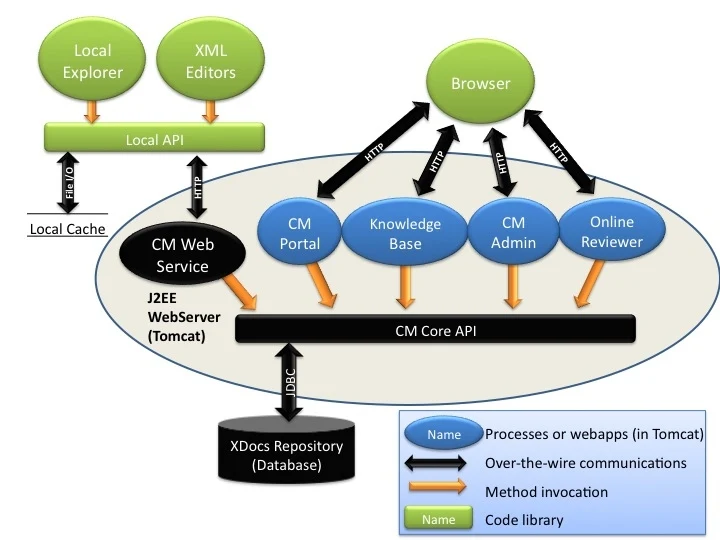
Green components run on the author's local machine, blue components are deployed on servers and accessed through a browser, and black components handle storage and core services. Local Explorer and XML editors work through the Local API and a local cache; CM Portal, Knowledge Base, CM Admin and Reviewer run as web applications on a J2EE web server (Tomcat in this example) and access the XDocs Repository database through the CM Core API.
Local Explorer (local): the core workbench for content teams, managing source content, target content and localization workflows; the local cache can drive desktop editors such as FrameMaker, XMetaL and Oxygen, as well as non-XML tools such as Photoshop and Visio.
XML editor (local): every Explorer seat bundles XMLmind XML Editor (XXE) at no extra cost, so structured authoring can start immediately.
CM Portal(Web): quick browser access to folders and files, with content previewable as HTML / PDF.
Knowledge Base(Web): a content portal for external customers, delivering published content as HTML.
CM Admin(Web): the governance hub for projects, workflows, security and extended metadata.
Reviewer(Web): SME reviewers review in the browser with no installation.
XDocs system components Source: XDocs documentation, About the XDocs CCMS, Figure 1
Content organisation and reuse: moving never breaks links
Project folders mirror the documentation architecture
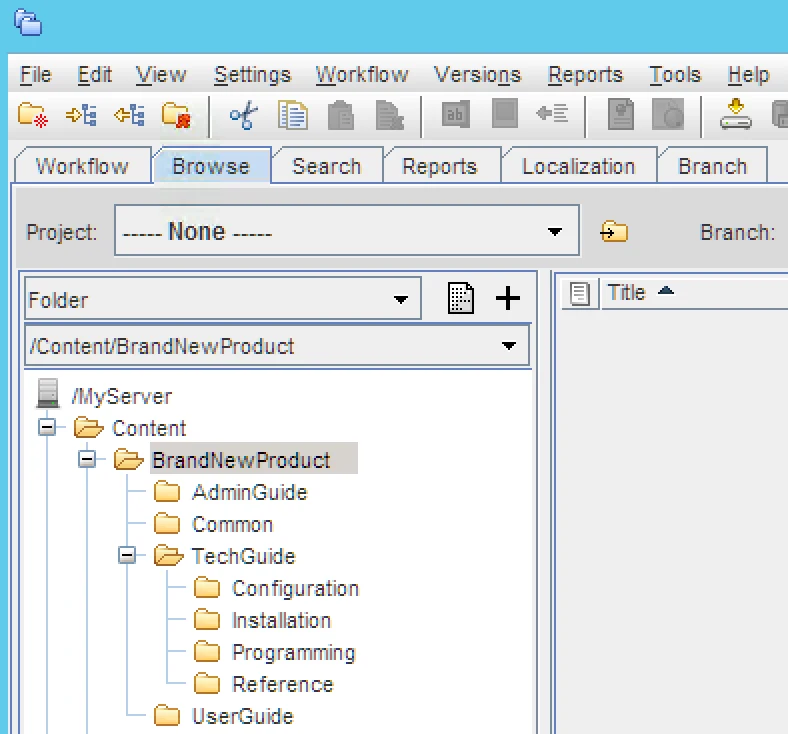
We recommend one project folder per product, split into guides by audience (administration, technical, user), with a Common folder holding topics and images reused across guides; DITA maps and bookmaps sit at the project root.
Renaming and moving never break links: renaming or moving files and folders in the library keeps links valid inside files and DITA maps — the key to a single source that stays maintainable over years.
Organise by information type: store concept, task and reference topics separately, combined with conditions and reuse to output for many models and markets.
Project folders in the Browse tab Source: XDocs documentation, Set up project folders
Governance and workflow: versions, branches and review trails
CM Admin: set the rules
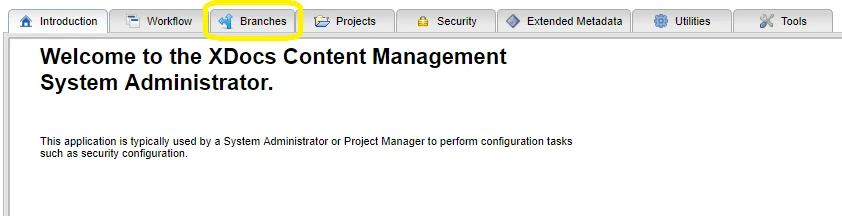
System administrators and project managers configure governance in CM Admin: create and manage branches, define projects and workflows, configure group-based security policies, and manage extended metadata attributes.
Two workflow views: My Tasks handles personal tasks; Processes starts and monitors workflows, with administration rights held by the built-in XDocsWorkflowAdmin group.
Task lifecycle: Claim, Finish, Approve or Reject; files can be packaged into a workflow package.
Connect to external workflows: copy a task URL (Wex) to plug XDocs tasks into your existing approval system.
CM Admin tabs: Branches is used to create and manage content branches. Source: XDocs documentation, Branches Tab, Figure 1
Localization moduleTranslate only what changed: Revision / Cycle, automated two-way LSP exchange, incremental export packages
XDocs splits localization objects into two layers: content versions are locked by Revision and translation batches are organised by Cycle Put simply:
A revision tracks one change to content— every time content is modified, a new revision is created.
A cycle is a collection of revisions, representing one localization batch — which content, sent to which supplier, and in what state, all at a glance.()
Revision: a new version only when something changes
Every edit creates a new revision, so the system knows exactly what changed — the technical basis for incremental translation.
Cycle: manage translation batch by batch
Package several revisions into one translation batch, with dispatch progress and return status across suppliers in one view.
Supplier portal: status visible both ways
Suppliers submit quotes and deliver translations in the portal; the enterprise approves or rejects quotes and downloads translations, with email notifications throughout.
Automated or manual localization, chosen by IT constraints
Method
Preconditions
How it works
Auto Localization Automated localization
The enterprise allows suppliers to access the XDocs server directly
IT security policy does not allow external access to the server
Export a localization package for the supplier and import translations back into XDocs; functionality matches the automated route
Automated localization flow
FTP / SFTP exportXDocs pushes content to be translated into the supplier's directory
Supplier quotingThe supplier takes the content from the server and quotes
Enterprise approval or rejectionThe quote is reviewed; approval moves to translation, rejection ends the run
Automated translation and returnAfter approval the supplier translates; translations are returned to XDocs automatically
Email notification at every stepEach step automatically emails the people involved
Option: direct local LSP connectionWithout FTP/SFTP, a local LSP can push and pull files directly
Any party in the localization value chain — the enterprise, translation suppliers or agencies overseeing translations — can access content securely through the XDocs portal.
Incremental export package: structure of a localization package containing only changed content.
What is in the export package— suppliers receive a structured package with clear responsibilities at each level:
XDocsMeta: package metadata that XDocs uses to identify and process this export
bookmap folder: the DITA maps and topics involved in this export
Other folder: related non-DITA content
Language tag in the file name (e.g. LBLV): marks the translation language so returns are matched automatically
/LznExportUnresolved: holds unresolved references for manual review
What it means for you: which content changed, what to translate and how much to pay — the system works it out, so you never pay to re-translate a whole book.
Mi module: manufacturing content automationTurn ERP BOMs into illustrated parts catalogues: a 10-step pipeline with three delivery formats
Mi(Module Manufacturing Suite)is the manufacturing module of XDocs: it uses ERP material master data + engineering drawings to generate parts catalogues automatically and deliver print / CD-DVD / web in three formats without re-layout for each.
defined 10-step workflow:
Create or import data (ERP material master data / CSV files / BOMs)
Enter and manage reference images (drawings from CAD / PLM / PDM systems)
Build the parts catalogue with a drag-and-drop IPC editor
Generate content automatically (catalogue text and tables)
Validate and correct data
Export validated data to XDocs
Set the publishing format with a stylesheet
Publish to print, CD-DVD or web
Index the published catalogue so users can search it
CD or web deliverables support ongoing data maintenance and updates
Mi module: workflow from ERP/CSV and CAD/PLM data to structured publishing. Source: Module Manufacturing Suite, Figure 2.
The delivery portal and online parts catalogue look like this:
Web delivery portal home page (example). Source: Module Manufacturing Suite, Figure 6.Interactive online parts catalogue page (example). Source: Module Manufacturing Suite, Figure 7.
Estimate your return
The numbers above are someone else's. Your content volume, target languages and update frequency differ, so the return differs too — put your own figures into the estimator.
XDocs is software you can use straight away. We stay with you from content audit to go-live, so the platform starts saving money as soon as possible.
01
Rapid implementation and content migration
Whether your manuals, parts catalogues and FAQs are old or new, we break them into topics, clean and model them, and migrate them into XDocs to build a reusable content asset library — with no business interruption during migration.
02
Native connection to the AI translation platform
Using the Ray AI enterprise translation platform and the XDocs Revision / Cycle mechanism, only changed content is sent for translation and returns are matched automatically, cutting both cost and lead time.
03
Deep custom integration
Connect your ERP / PDM / CRM through the open XDocs CM Core API (OpenAPI 3.0.1 REST interfaces). Note: the architecture for deep integration is complete and is now in technical confirmation with BlueStream.
Frequently asked questions
What does it require from IT?
XDocs runs on the standard J2EE stack on a Tomcat application server, supporting Linux and Windows. Most enterprises can use their existing infrastructure without buying dedicated hardware for a CCMS.
Is the bundled XML editor enough, or do we need to buy one?
It is enough to start. XDocs bundles the well-known XMLmind XML Editor (XXE) for authors at no cost, covering most structured authoring needs out of the box; teams that prefer Oxygen and similar editors can connect them flexibly.
We do not have a dedicated translation team — how does localization work?
Both routes work: with an external LSP, the XDocs supplier portal covers quoting, approval and delivery end to end, with automated two-way FTP/SFTP exchange; for smaller volumes, the Ray AI enterprise translation platform handles initial translation and post-editing at lower cost.
Can a small team use it, or is it too heavy?
Yes. In one case RefleXion Medical maintained about 20 publications with a single author — a one-person team benefits even more from topic reuse and a single source of truth, and needs the system safeguard more than a large team.
Who is the Mi module for?
For manufacturers managing materials and drawings in ERP / PLM / PDM: it turns BOMs and CAD drawings into illustrated parts catalogues and delivers print, disc and web formats from one source, keeping service content in sync with product updates.
How does XDocs relate to the Ray Content Platform?
They complement each other. XDocs is the content management and localization hub at the source of documentation; the Ray Content Platform handles conditional, audience-specific delivery and reading experience. As solution advisors we help you decide which layer you need and how to adopt it.
Let content startworking for you。
Tell us your documentation volume and current translation setup, and we will run a return estimate on real data.